


 English


CREDITINFO + AI
Ask for business info just as you would ask a colleague.
Reliable Creditinfo business information is now available directly in your AI chat! And soon through the new AI Assistant in e-Krediidiinfo. Ask about a company, customer, supplier or competitor in a simple sentence, exactly when you need to make a decision.
Use it wherever you work most comfortably.
Choose the way that suits you best: connect Creditinfo to your existing AI chat or, coming soon, use the AI Assistant directly in e-Krediidiinfo.
AVAILABLE NOW
Creditinfo in your AI chat
Connect Creditinfo to ChatGPT, Claude or another AI tool that supports MCP. Ask for business information right where you already work with AI.
- No need to open a separate portal
- Ask questions in plain language
- Use Creditinfo facts as part of your AI workflow
COMING SOON
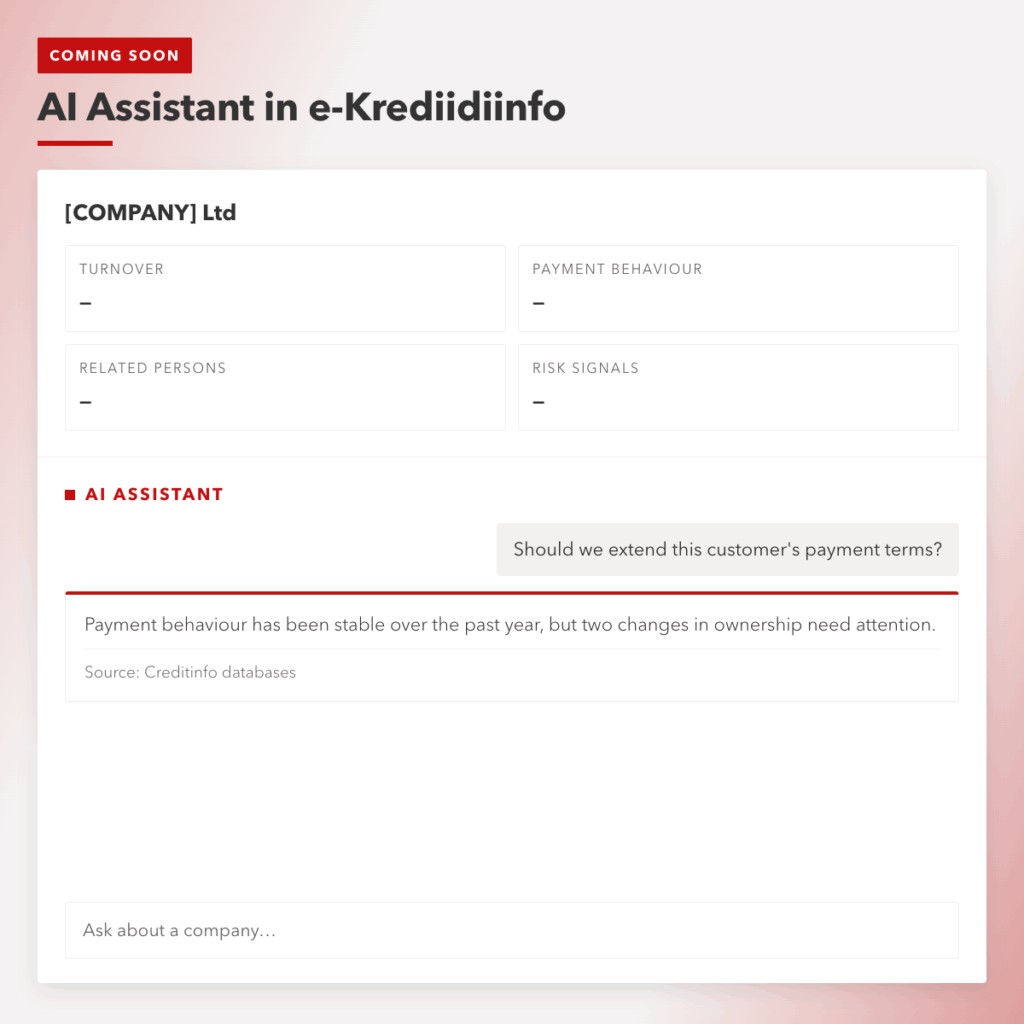
Creditinfo AI Assistent e-Krediidiinfos
Interact with Creditinfo data directly in the e-Krediidiinfo portal. No separate technical setup required.
- Creditinfo data in one place
- AI helps summarise the most important information
- Ideal for everyday background checks
Make your everyday work easier.
Copy a question and give it a try.
You do not need to know which view or register to search. Simply describe your question in plain language and ask about the company what you really need to know. You will receive a clear, easy-to-understand answer, with numerical facts sourced from Creditinfo databases.
1.
Quickly check a customer’s background
A useful first query when checking a new customer or partner.
use Creditinfo MCP
Give me a brief overview of the company [COMPANY]. Highlight its financial indicators, payment behaviour, related persons and any potential risk signals.
2.
Should I offer a payment term?
Use this before granting credit or offering a longer payment term.
use Creditinfo MCP
Assess whether I should offer the company [COMPANY] a 30-day payment term. Highlight the information I should take into account before making a decision.
3.
Prepare quickly for a meeting
Use this to prepare for a sales or partner meeting.
use Creditinfo MCP
I have a meeting with the company [COMPANY]. Prepare a brief overview of the company’s activities, latest financial results, related persons and potential risks.
4.
Check payment risk
Suitable for assessing the risk of an existing or new customer.
use Creditinfo MCP
Review the financial data and payment behaviour of the company [COMPANY]. Highlight any violations or other signs that I should pay attention to.
5.
Assess supplier risk
Use this before selecting a new supplier or signing an important contract.
use Creditinfo MCP
Analyse the company [COMPANY] as a supplier. Highlight financial and payment-behaviour information that may indicate risks related to cooperation or supply reliability.
6.
Compare three partners
Suitable when selecting a supplier, partner or potential customer.
use Creditinfo MCP
Compare the companies [A], [B] and [C]. Highlight the main differences in their financial position, payment behaviour and other risk signals. es.
7.
Assess a potential customer
Use this before your first sales call or meeting.
use Creditinfo MCP
Give me an overview of the company [COMPANY] and help me assess its background, size and financial position. Highlight the points I should know before making contact.
8.
Keep an eye on competitors
Get a quick overview of a competitor before making a decision or starting a discussion.
use Creditinfo MCP
Give me a brief overview of the development of the company [COMPETITOR] over the past two years. Highlight the most significant changes in its financial indicators.
How does it work?
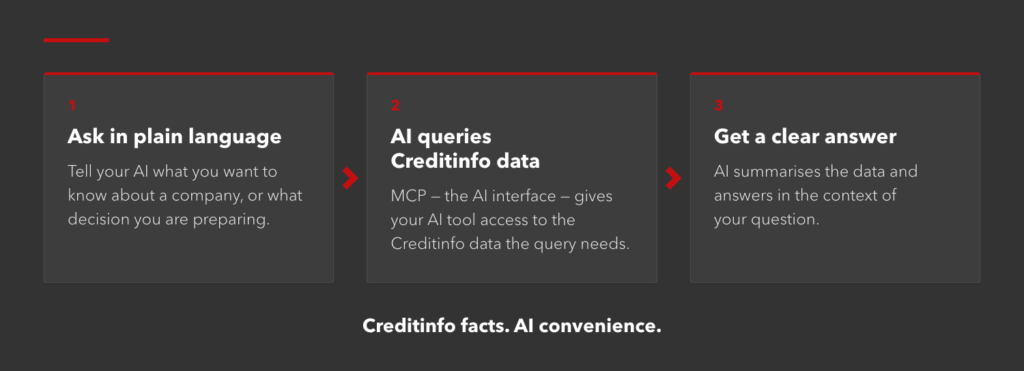
How to connect Creditinfo to your AI?
The setup only needs to be completed once. After connecting, you can ask for Creditinfo business information directly in your AI tool — without having to open the e-Krediidiinfo portal separately every time.

1. Create a new one or use an existing account
Register a user account in the Creditinfo Account Portal or log in with an existing account. The Account Portal manages access and usage limits.
2. Add Creditinfo MCP to your AI tool
Open the connections or MCP settings in your AI tool and add a new Creditinfo connection.
3 . Authorise the connection
During the authorisation process, log in using your Creditinfo Account Portal account and confirm the connection. After that, you can start using Creditinfo data in your AI chat.
4 . Get started for FREE
You can currently try Creditinfo MCP for free. The free plan has limits on the number of queries and the amount of information available. For higher usage volumes, please contact us.
Creditinfo’s existing customer packages and portals will continue to work as before.
Creditinfo Business Information AI Assistant
COMING SOON TO E-KREDIIDIINFO
If you prefer to use Creditinfo directly in e-Krediidiinfo, you will soon be able to search for and analyse company information through a conversation.
Ask your question in plain language, and the AI Assistant will help find and summarise relevant information from Creditinfo data.
- No separate technical setup required
- Answers are based on Creditinfo data
- Suitable for everyday customer and supplier checks
Reliable business information. A new way to use it.
The way you access the data is changing — not what Creditinfo’s trusted information is based on.
A.
Creditinfo data
The answers are based on Creditinfo business information and data sources.
B.
Ask a simple question
You do not need to know which view or register to search.
c.
Use it when you need it
Check a company or prepare for a decision exactly when you need the information.
Everything you need to know before using it for the first time
If you have any questions, take a look at the frequently asked questions. If you cannot find the answer, feel free to contact us.
An MCP enables your AI tool to request business information from Creditinfo and use it when generating a response. This means you can ask for Creditinfo information directly in your AI chat.
The Creditinfo guide supports the use of ChatGPT and Claude. In addition, the connection can be used with AI tools that support MCP, depending on their configuration options.
You can get started for free. The free plan has limits on the number of queries and the amount of information available. To access a larger volume, please contact us.
No. MCP enables you to use Creditinfo data in your own AI tool. AI Assistant enables you to chat directly with Creditinfo data in e-Krediidiinfo.
No. Creditinfo’s existing customer packages and portals continue to work as before. AI solutions add a new way to use the same reliable business information.
Creditinfo’s AI solutions use information from Creditinfo’s databases when generating responses.
Try a new way to use Creditinfo
Ask for business information right where you already work. Connect your AI tool to Creditinfo databases and ask your first question!
Local News

Update of the Principles of Personal Data Processing